



When you open a patient’s appointment history, you’re usually looking for one thing: when they’re coming in next. Maybe you need to confirm whether a follow-up happened, or find out if a previous visit was cancelled or missed. Either way, the answer shouldn’t require untangling their entire appointment history.
That’s why we’re introducing appointments overview. Because it lives inside the individual patient’s chart, it stays focused on their schedule, not the clinic’s. It brings their next visit, future appointments, completed visits, cancellations, and no-shows into one place, so you can spot the details you need more easily.
Their Next Visit, Front and Center
You’ll find the appointments overview by clicking the new button at the top of the appointments page of a patient’s chart. The overview opens on upcoming appointments, with their next visit first. Past appointments and cancellations or no-shows are kept in separate tabs, so each part of their appointment history is easier to scan.
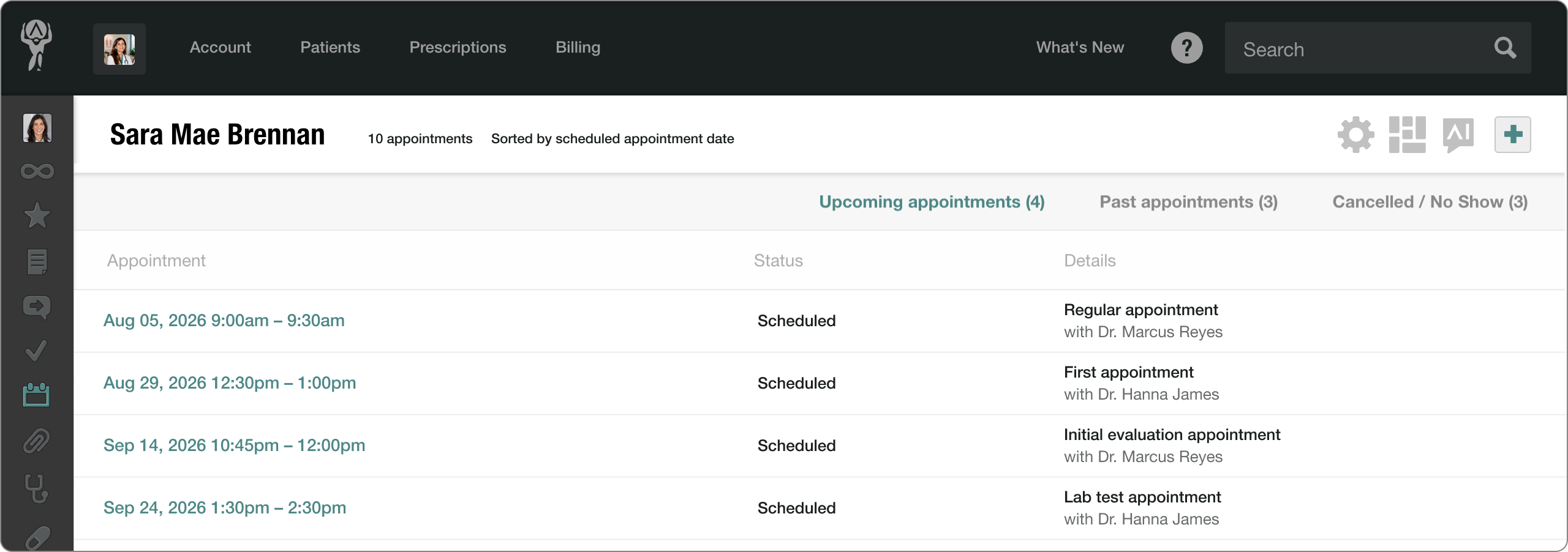
With this feature, you can:
- Save time by finding the patient’s next scheduled visit without digging through their history.
- Get the full picture by seeing both upcoming and past appointments in one place.
- Make sense of their history by separating past visits from cancellations and no-shows.
- Manage appointments in place by adding new ones, editing details, changing their status, or deleting them.
Need more detail? You can open the full chart entry for any appointment directly from the overview, or make changes without bouncing around the patient’s chart.
Whether you’re confirming what’s next, checking whether a follow-up happened, or figuring out why an appointment never did, Appointments Overview puts the answer within easy reach.
For more information on how this feature works, check out our support article. And if you have any questions, please don’t hesitate to drop us a line at support@atlas.md.