



Every doctor documents a little differently. Some prefer shorter notes. Some want a specific SOAP structure. Others rely on certain wording, macros, or formatting habits that keep their charting consistent from one patient to the next.
To provide more flexibility and control when it comes to generating AI SOAP notes and AI referrals, we’re rolling out custom AI prompts. Instead of relying on one default output style, you can now tell Atlas.md exactly how you want those results formatted, phrased, and organized.
Make AI Documentation Fit Your Workflow
This update gives you more control over the final shape of your AI-generated documentation, without adding extra steps to the charting process.
- Save time on edits by shaping AI output around the way you already document.
- Reduce repetitive cleanup when SOAP Notes or referrals need the same structure every time.
- Protect your clinical workflow by keeping AI flexible enough to match your preferences.
- Unlock more useful automated AI SOAP Notes by applying your custom prompt even when Atlas.md runs the AI action in the background.
- Strengthen consistency across notes and referrals so your documentation feels more familiar from the start.
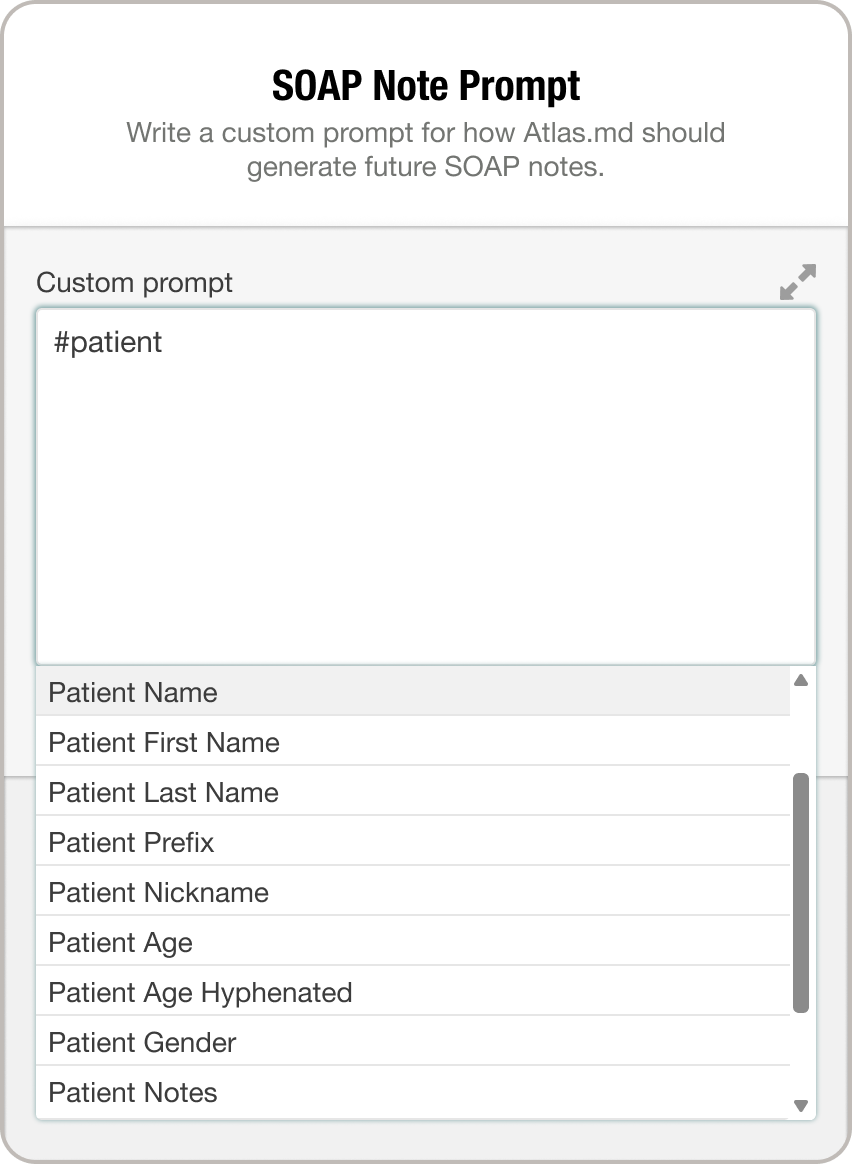
Custom AI Prompts are managed from the new AI Prompts page in Account settings. From there, you can create custom instructions for supported AI-powered features, including SOAP Notes and AI Referrals.
Macros Work Inside Prompts Too
You can also use familiar shortcuts like #patientlastname, #patientage, #vitals, and more while shaping your AI output. Once saved, your custom prompt is used the next time you run that AI action manually, and it also applies to automated AI function calls, including automatic AI SOAP Notes.
For more information on how this feature works, check out our support article. And if you have any questions, please don’t hesitate to drop us a line at support@atlas.md.