



A medication package already contains the information your inventory needs. Until now, getting that information into Atlas.md meant carefully copying the NDC, lot number, and expiration date by hand. It’s repetitive, takes time, and leaves room for a mistyped digit.
With the medication package scanner, Atlas.md does the work for you. Simply scan the package with your computer or phone camera, then review the details before adding the medication to your inventory.
Add Inventory Straight From the Medication Package
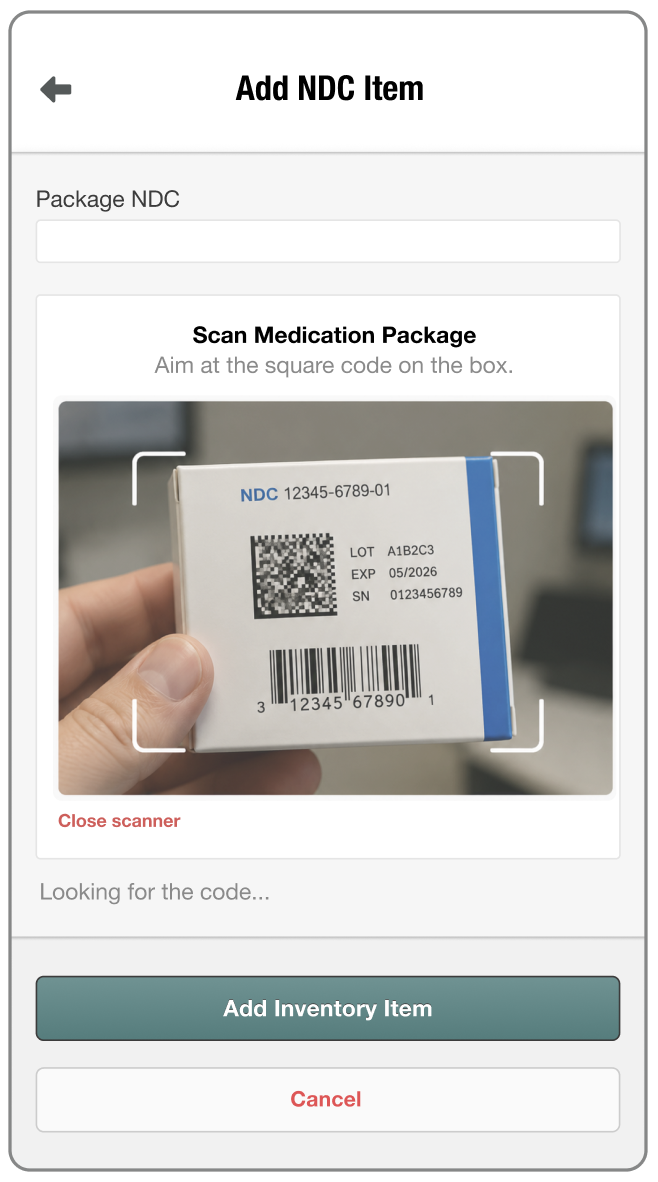
With the medication package scanner, you can:
- Save time when stocking medications by scanning the package instead of entering every detail manually.
- Reduce entry errors by automatically identifying the medication and, where supported, capturing the lot number and expiration date.
- Stay in control by reviewing and editing every field before adding the medication to inventory.
And if your camera isn’t available or a code won’t scan, no problem. You can always enter the information manually without interrupting the workflow.
For more information on how this feature works, check out our support article. And if you have any questions, please don’t hesitate to drop us a line at support@atlas.md.