


Every cryptic filename in your files inbox creates another small interruption. Staff have to open the document, find the patient’s name, work out what kind of file it is, and only then decide where it belongs.
AI files inbox details removes that first-pass work. Atlas.md reads incoming PDFs and adds the patient’s name, a document category, and a short plain-language summary directly beneath the filename. This means that staff can understand, search, and triage documents from the Inbox without opening every file.
Know What’s in Every Inbox File Before You Open It
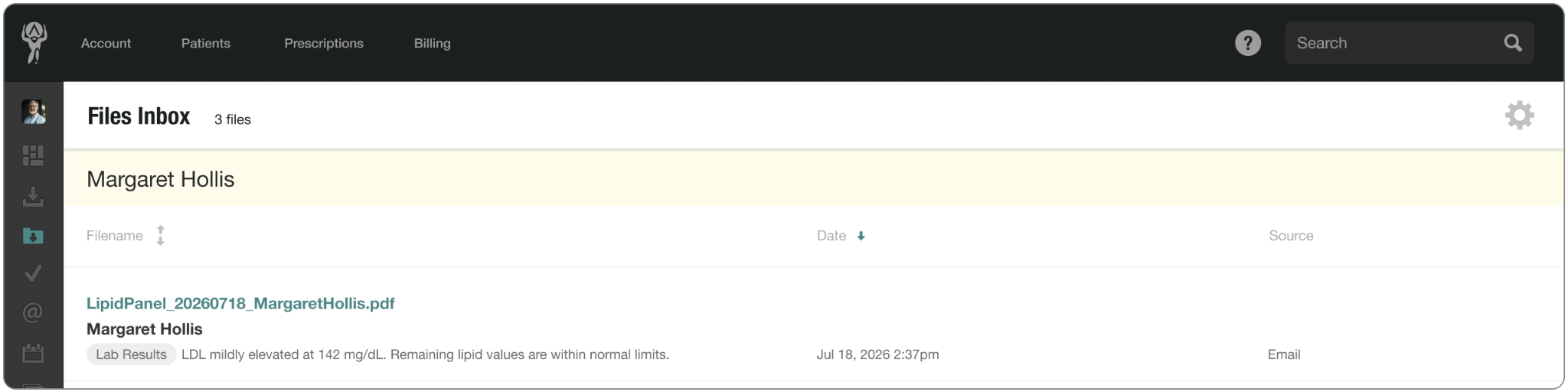
Enriched details turn a list of machine-generated filenames into an inbox your team can actually scan and work through.
- See the patient, document category, and summary directly in the files inbox list.
- Search by patient name, category, or words from the summary, even when the filename tells you nothing.
- Confirm the patient’s name and date of birth when previewing a file.
- Reduce misfiling by identifying who a document belongs to before adding it to a chart.
Once a PDF reaches the Files Inbox, Atlas.md adds the context your team needs to handle it: who it belongs to, what kind of document it is, and a short summary of what it contains.
For more information on how the feature works, check out our support article. And as always, if you have any questions, please drop us a line at support@atlas.md.